

Fund your account
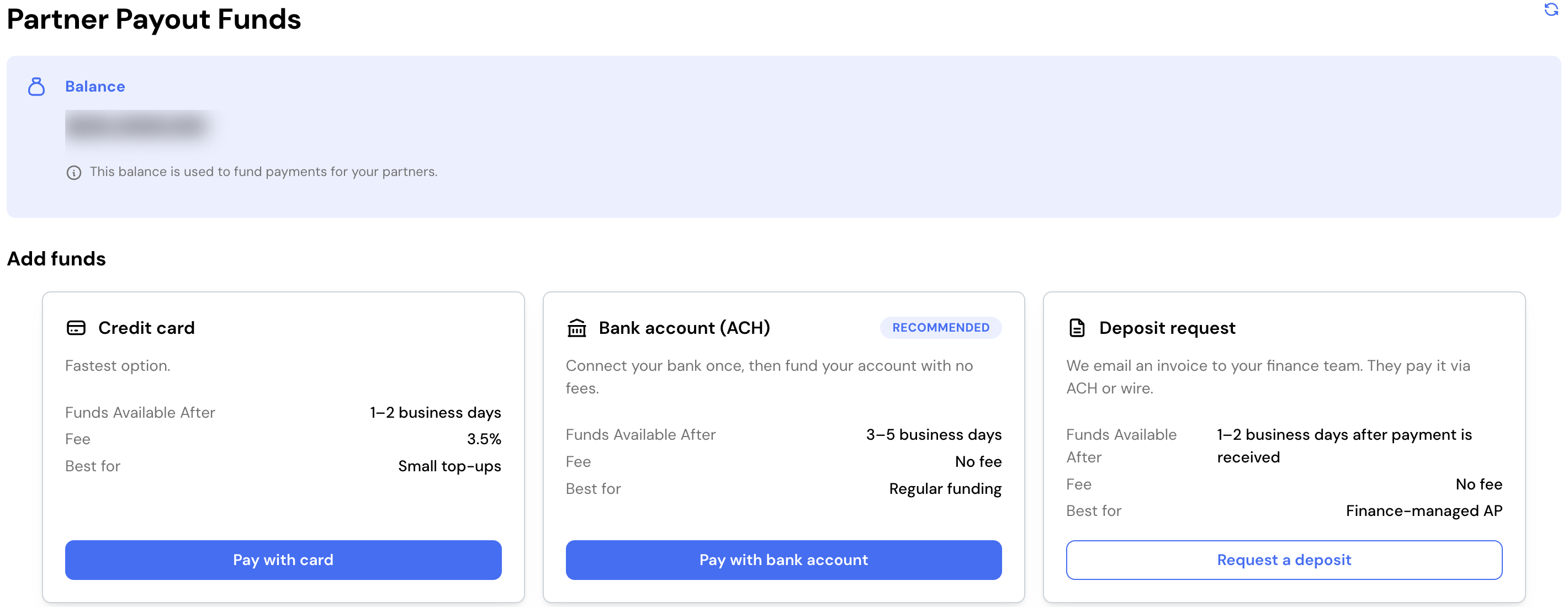
Lasso pays your partners from your account balance. Keeping that balance topped up is what keeps partner payments moving. When you send a payout, the total is drawn from your balance and distributed to your partners.
This is for admins who manage account funding.
What it does
Funding gives you a single balance to pay partners from. There’s no separate billing step for each payment: you add funds to your account, and your payouts pull from that balance. Because of this, you add funds ahead of a payout rather than per payment, especially before a large one.
Your account also keeps a running record of everything that affects your balance: the funds you add and the payouts drawn from it. You can use this to reconcile your balance, confirm a deposit landed, and trace where your funds have gone.
What you need first
- Admin access to your account’s funding settings.
- An upcoming payout to fund. See Run a payout for how payouts draw from your balance.
What you can configure
- How you add funds: Lasso supports more than one way to top up your balance, so you can choose what suits the amount you’re moving.
- Reviewing your balance and history: your available balance and a full record of deposits and payouts are always on hand.
See the full guide
The complete walkthrough, covering adding funds, reading your available balance and transaction history, and how deposits and refunds are handled, lives in your Lasso account.